RaceTac
RaceTac Committee Manual
SETTINGS:
(In Android version, setting is under the app menu 'Settings'. In iOS the settings are under the device settings, look for 'RaceTac Committee')Sounds: Choose the sound type: Tones (default), Voice Announcements, or None.
Finish Log Export Type: Choose the file type you want for exporting the finish time log. Either CSV or Excel XLSX. See settings menu.
Start Rule: Choose either Rule 26, or Match racing rule C3.
START PENALTY FLAGS: Choose a 'Rule 30' prep flag. I, Z, U, Black Flag, and Z with I. Select in the menu.
START SEQUENCE SCREEN: (Android Shown)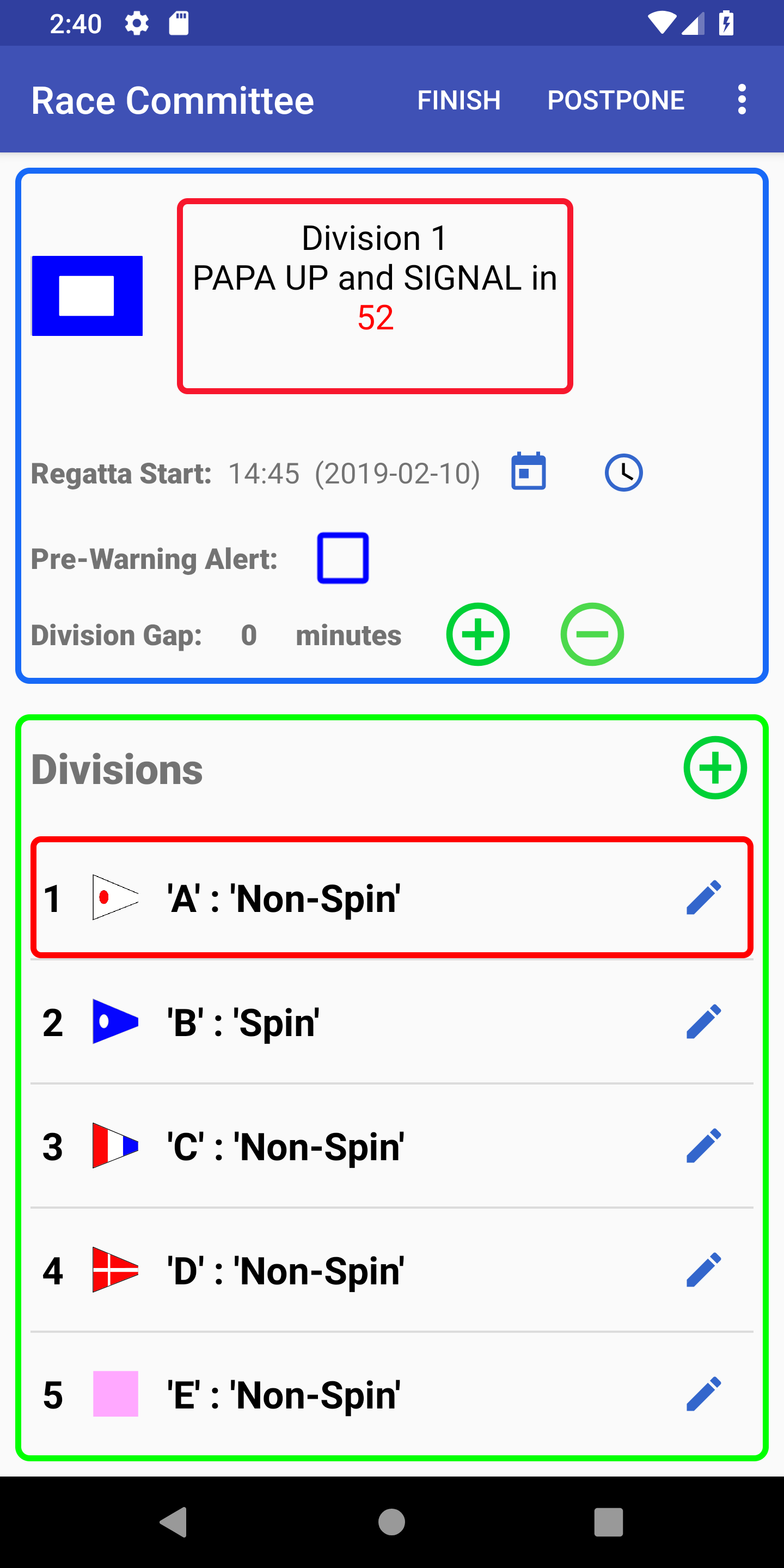
- STATUS AREA: An image of the next or current flag involved in the upcoming event. Or a boat image if not within the start sequence. And a status box showing the next event requiring committee action.
- Regatta Start: This is the actual start time of the FIRST Race. The 'Warning' will be 5 minutes earlier (or 10 minutes for the 'Attention' for Rule C3), and any 'Pre-Warning Alert' 1 minute before the warning (or 'Attention' for rule C3). The default is the existing saved time. Tap the word 'SET' to change it as needed for iOS, or the clock or calendar icons on Android.
- Pre-Warning Alert: An Optional Alert, sounded one minute before the usual 'Warning' for the first division only.
- Division/Match Gap: The number of minutes between one Division/Match's start and the next one's Warning. Zero would be the traditional 'Rolling Start' where one Start is the Warning/Attention for the next.
- DIVISIONS/MATCHES AREA:
- NOTE: You do not have to add divisions or matches. The App will asume a single division/match start sequence if you don't add any.
- Tap the '+' to pop up a dialog to add a Division or Match.
- Add Division/Match Dialog:
- ID: Enter the short 'ID' such as a number, or a letter.
- Enter a 'Type' which could be a class name such as 'Spin', 'Non-Spin', 'IRC', or perhaps a boat type for a one-design.
- Choose a sequence with the drop down spinner. The order is defaulted to be the last one, but can be moved up. If moved up, all others are moved down.
- Choose a flag from the flag icon dropdown. Currently offering common solid colors as well as the numeric flags (in numeric order).
- Editing and Deleting Divisions/Matches: Tap the button on the right of the entry ('i' for iOS, a pencil icon for Android) to pop up and edit dialog. Works the same as the 'add' dialog, but with a 'Delete' button.
- TOOLBAR (iOS version):
- 'Clear': Removes all divisions. Will prompt for confirmation.
- 'Finish': Switches to the Finish Time logger screen.
- 'AP Flag Icon': Postpones the start sequence per the RRS. Tap again to restart the current division sequence (when you drop the AP flag). Per the RRS, the division warning will be one minute after you tap this to continue.
- 'Prep Flag Icon': 'P Flag'. Tap this to change the starting penalty rule, as per the RRS rule 30.
- 'More': Brings up a submenu to get to Boat Management, Scoring, and Help.
FINISH TIME LOGGING SCREEN: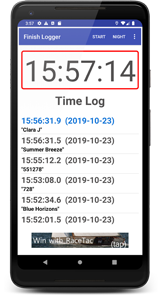
- Tap Clock inside red border to log a time entry.
- Log has most recent time at top, highlighted.
- Log is automatically saved, and restored when app is restarted.
- Tap any entry for a dialog to add a Boat ID (Name or Sail #), or to delete an entry.
- Tap 'Night' to change colors for better night time visibility.
- Tap 'Clear' to clear the log.
- Tap 'Send or Export Log' (Android) or 'Email Log' (iOS) to pop up the appropriate app and send the log as a CSV or XLSX (Excel) attachment. Filename will be 'RaceTacLog_<timestamp>.<csv or xslx>' where the timestamp will be of the most recent time in the log.
- Note: To select CSV or Excel (XLSX): For Android, use the main menu settings. For iOS, use the regular app settings from iOS settings.
BOAT MANAGEMENT: (Android Pro and iOS)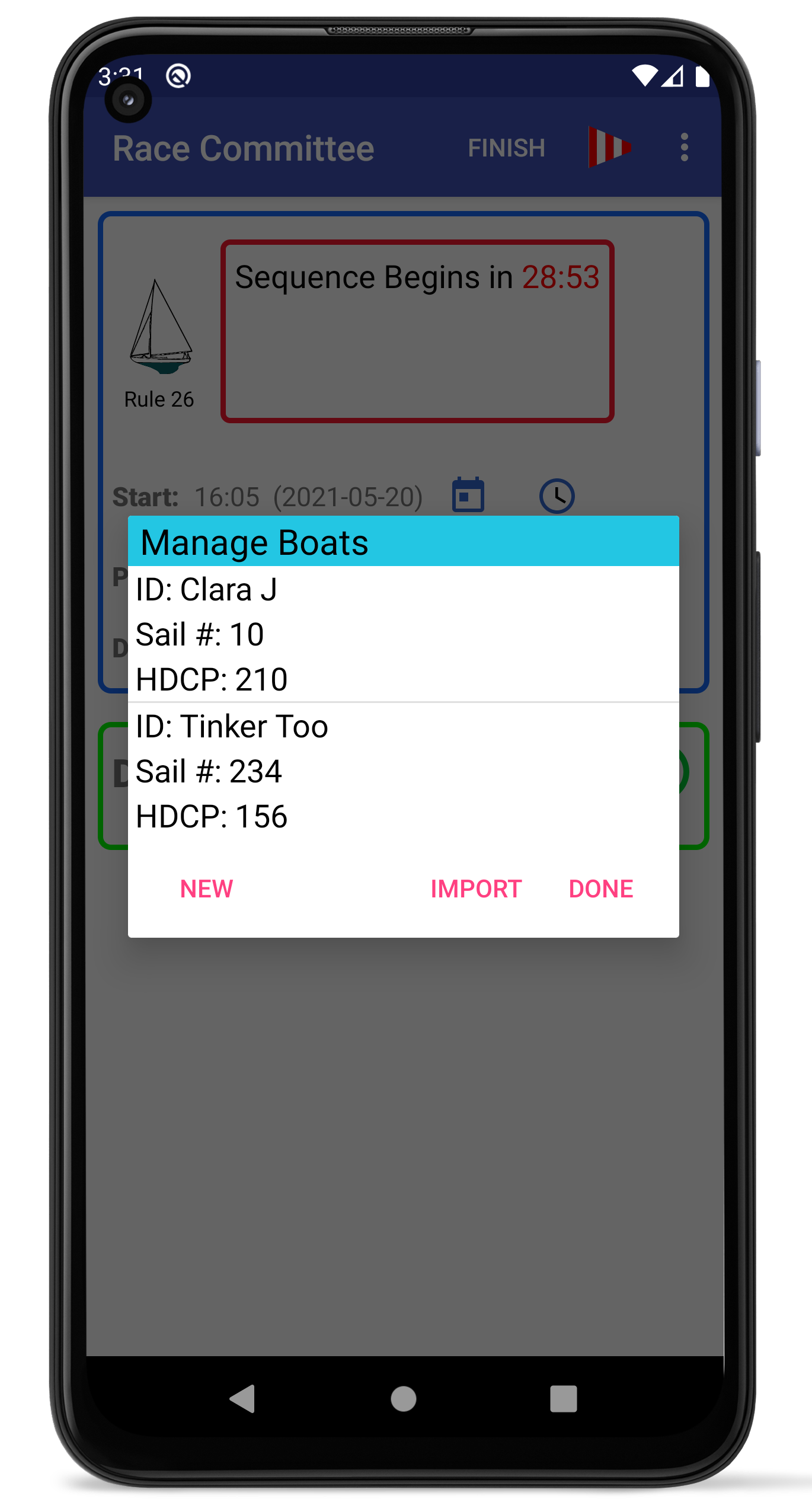
- Access from the menu. On iOS it is in the 'More' menu.
- You can enter new Boats which are saved for future use.
- The Boat ID is usually the boat name, although it could be a sail # if the boat does not have a name, just some unique ID.
- HDCP is the handicap used in the scoring module, but can be left zero for One-Design fleets. Use the value appropriate for the handicap system you are using, such as PHRF, SCHRS, Portsmouth Yardstick (100 or 1000), or IRC.
- Tap an existing boat entry to edit it or delete it.
- Import a list of boats from a CSV file. An example file is:
- In the Finish Log, if you tap a finish entry, you can also edit/add boat info directly from there.
- Many of the 'Boat ID' fields in the system will show a list of possibly matching boats as you type to save you time. For example, if you had two boats that started with the letter C, such as 'Circe' and 'Clara J', just typing a C would create a dropdown of those two boats (and others with a C in them). Clicking one will fill in all the saved data for you.
# File defining boats to import into RaceTac Committee App.

# Comments are lines starting with '#' or '!'.

# Blank lines are allowed.

# Note: For Division #, if the race has no such division, the boat will be assigned to the 'Unassigned' group in scoring, and you can manually override it.

#   Or you can also enter 0 .

# Fields:

#   Name/ID, Sail Number, Handicap (PHRF, PY100, PY1000, SCHRS, etc...), Default Division #

# Example lines:

Clara J,10,210,1

Tinker Too,234,156,1
REGATTA MANAGEMENT SYSTEM (RMS) SYNCHRONIZATION: (Android Pro and iOS only)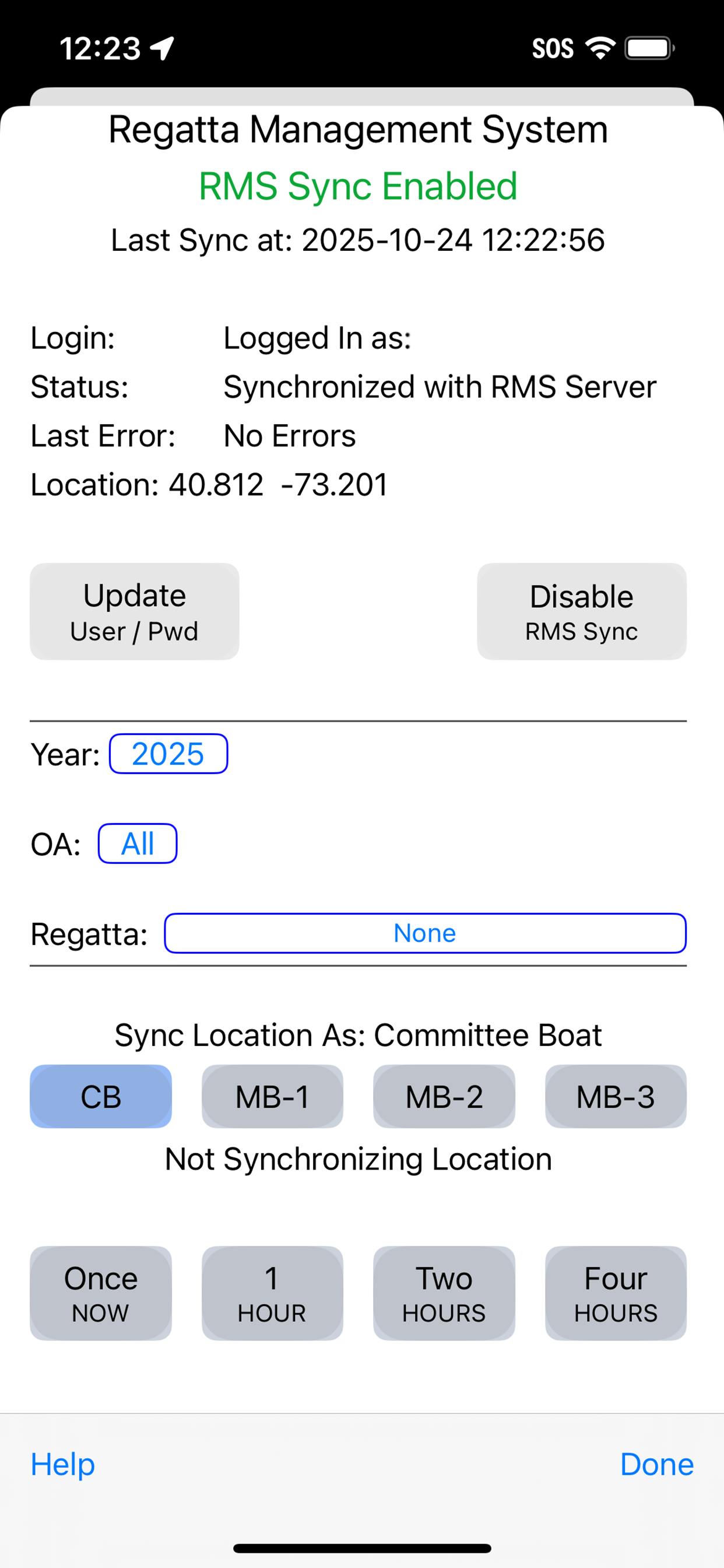
- Access from the menu. On iOS it is in the 'More' menu.
- The app will download the list of boats for a regatta, and will use them for the finish log functions when RMS Sync is enabled.
- NOTE: Noat info is not editable in 'Sync' mode. You must edit any boat info in the RMS system, and it will sync down to the app about once a minute.
- You must have an ID on the RaceTac Regattas RMS. See it HERE.
- Enter or update your username (an email address) and password by tapping the 'Update User/Pwd' button.
- Enable or Disable synchronizing by tapping the 'Enable RMS Sync' button. The button changes from Enable to Disable as appropriate.
- Choose a regatta to sync with using the Year, OA (Organizing Authority, like club or association), and Regatta buttons. A dialog will come up showing you the options.
- Choose a location type to send up to the RMS system. CB For Committee Boat, or one of the Mark Boats (1-4)
- Choose a frequency to sync for. Once, or every minute for up to 4 hours.
- The coordinates are display in the RMS web system in the Regatta's 'Real Time Locations' Box.
Location Sync:
SCORING SCREEN: (Android Pro and iOS)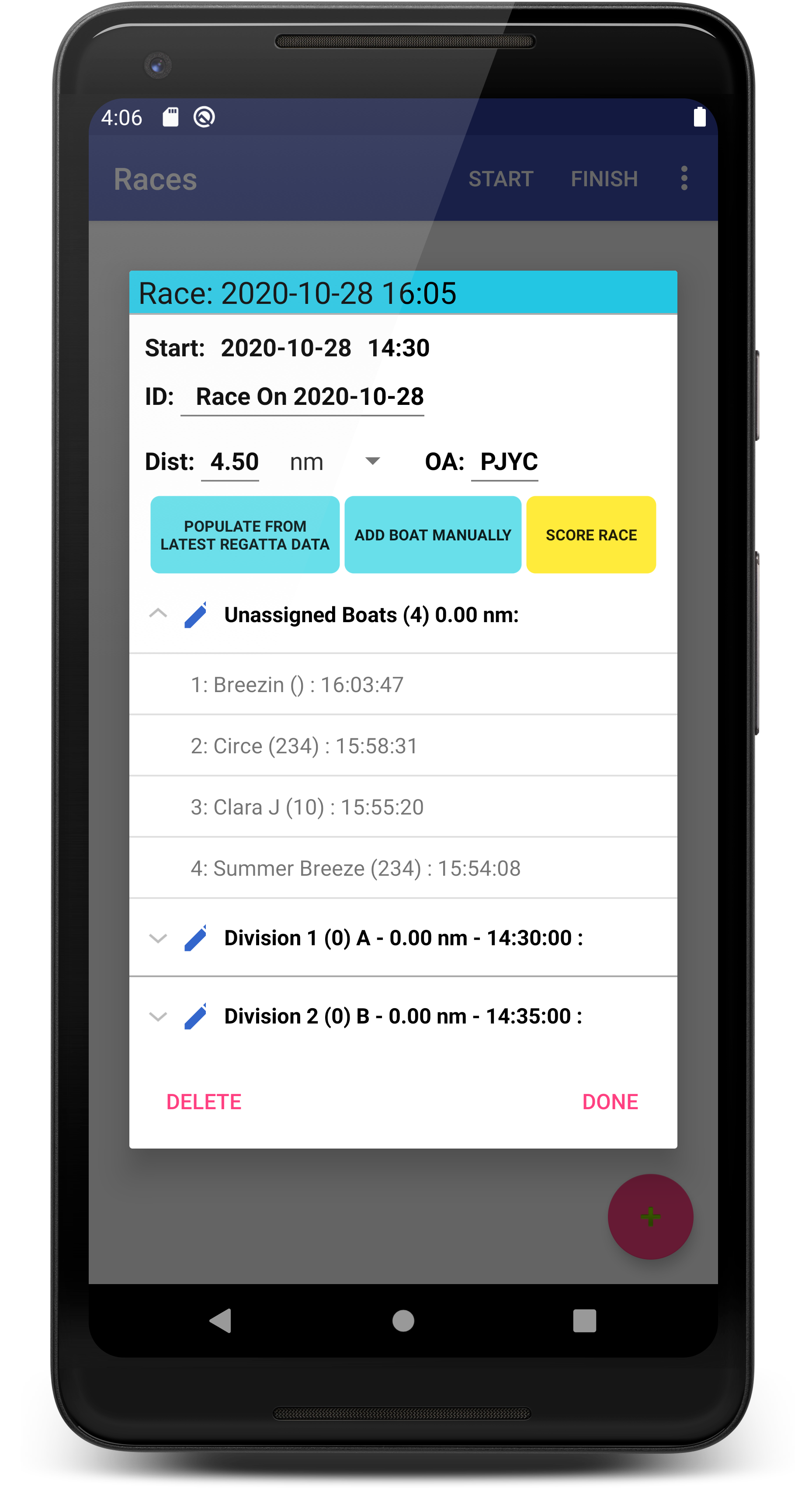
- Access from the menu. On iOS it is in the 'More' menu.
- Scoring is per the RRS Appendix A 'Low Point System' in section A4.
- Races are organized to have multiple Divisions, as is the Start mode screen.
- Divisions will inherit the distance from the Race entry and handicap type (PHRF, SCHRS, PY100, PY1000, IRC) from the default app settings, but you can override them at the division level later.
- There is an 'Unassigned' division which is scored just like a regular division. You do not have to setup divisions if you have just one. It will score using the race distance and start time.
- Races are saved based on their first division start time. So you can use the same ID for multiple races.
- Tap the '+' button to add a new Race.
- Click the 'Populate From...' button to add boats and start times from the Finish Time Log. Or enter the data manually.
- Data populated from the Finish Log and Start setup are all COPIES of that data. Editing them here will not change the data in the Finish Log or Start screen. Thus you can override it here if needed.
- All Boats found in the Finish Log will be added to the 'Unassigned' group at first, and can be reassigned to divisons later. HOWEVER. you will get a warning if a boat in the Finish Log has not been given an ID. You can click this button again to add boats that have newly finished or have had IDs given to them. Go back to the Finish Log to fill in missing boat info first.
- There will be Divisions created based on those currently setup in the Start Mode page. You can edit this info later.
- Fill in the Race ID. This can be any text, and does not need to be unique. Not required.
- Fill in the Race Distance and choose the units.
- The 'OA' is for your Organizing Authority, such as a Yacht Club or Sailing Association name. Not required.
- Tap the 'Unassigned' group or a Division group to expand the list of boats in it. In iOS the Division groups do not expand or contract. NOTE: in Android, the number of boats in the group is in parens after the group title.
- Tap the Pencil icon (Android) or info button (iOS) in the Division header to edit things like its name and distance.
- Tap a boat entry to edit boat information. Tap the boat finish time to get a dialog to change that as needed. Tap the Div # to get a drop down (Android) or scroller (iOS) to choose which division to assign the boat to, or 'Unassigned'.
- NOTE: The 'Code' field is 'FIN' for a normal Finish. Other codes in the dropdown are based on the RRS Scoring codes found in Appendix A, section A11. Remember to score boats in the finish log if they drop out or don't show up! Score them with RET, DNS, DNC, or whatever as it does effect the points.
- Tap the 'Score Race' button to generate the scoring page which will have all the usual details. You may want to tip your device into Landscape orientation so you don't have to scroll the results display sideways (it is scrollable up/down and side/side).
- You may see that there are warnings. If so, tap the Warnings button to see details. You may need to fix things. Some warnings may not apply and you can ignore them. For example, a mix of zero and no-zero handicaps might be an issue, unless you really have a boat with a zero handicap (not likely).
- If you are scoring a One-Design fleet, you can usually just leave the handicaps as zero. If they are all zero you will not get a warning, and scoring will work fine, simply no handicap allowance is made.
- Tap the 'Send/Export' button to send or export the results in Excel™ format. (Email only on iOS)